Article Summary:
If you occasionally receive voicemail notifications or messages from unknown numbers that contain no sound or only background noise, you are not alone. This is a common occurrence across telecommunications networks, primarily caused by automated dialing systems and robocalls.
Primary Causes of Blank Voicemails
- Automated Voice Detection: Many automated call systems use Voice Activity Detection (VAD) to determine whether a live person or an answering system answered the call. When your voicemail greeting plays, the system may wait for a human voice. If it detects only silence after your beep, it disconnects, leaving a blank recording.
- Predictive Dialer Disconnects: High-volume call centers and automated telemarketers use predictive dialers that place multiple calls simultaneously. If an agent is unavailable when your voicemail system answers, the software drops the call—leaving open air on the line until your voicemail times out.
- Active Number Scans: Automated spammers frequently run scripts across sequential phone numbers simply to check if a line is active and monitored. Once your voicemail system picks up, the scan is complete, and the call terminates instantly without audio.
- Greeting and Message Timing Overlaps: Some automated systems begin playing a pre-recorded message immediately upon connection. If your personalized voicemail greeting is long, the caller’s message may finish playing while your greeting is still active, resulting in only dead air being recorded.
What You Can Do
Keep Greetings Concise: A brief, direct voicemail greeting reduces the chances of pre-recorded audio overlapping or dropping before the recording begins.
- Avoid Calling Back Unknown Numbers: Calling back unknown or spoofed numbers confirms that your line is active, which can lead to an increase in automated calls.
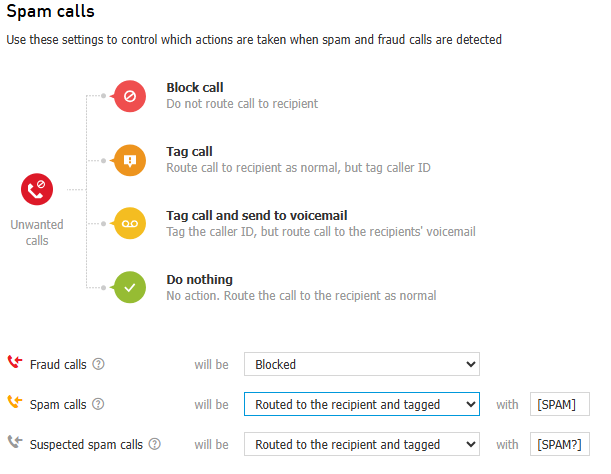
- Enable Call Screening / Spam Filtering: Utilizing Elevates built-in SPAM call filtering services can significantly reduce incoming automated calls before they reach your voicemail. Click here to create a support ticket for help with this.
Was this article helpful?
That’s Great!
Thank you for your feedback
Sorry! We couldn't be helpful
Thank you for your feedback
Feedback sent
We appreciate your effort and will try to fix the article