Overview
This procedure explains how to install the APP-5/APP-50/APP-51 EHS cable. Installing an EHS cable will allow Plantronics wireless headset Users to answer or end calls by pressing the answer/end call button on their wireless headset.
EHS is available on the following Polycom phone models:
- SoundPoint IP 320/321
- SoundPoint IP 330/331
- SoundPoint IP 430/450
- SoundPoint IP 550
- SoundPoint IP 560
- SoundPoint IP 650
- SoundPoint IP 670
- VVX 300/310
- VVX 400/410
- VVX 500
- VVX 600
- VVX 1500
Software Requirements
SIP Application 3.1 or higher
BootROM 4.1.0 or higher
Setup
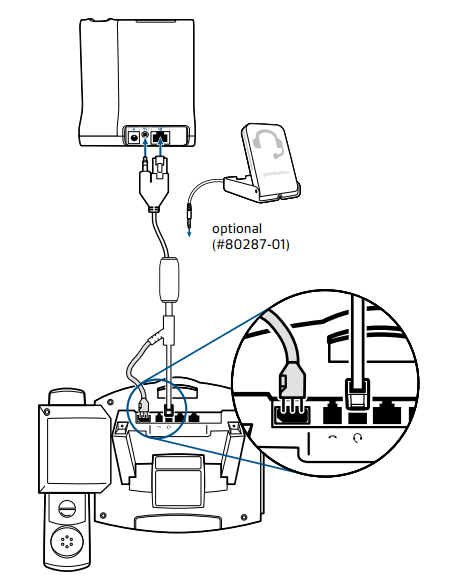
Polycom SoundPoint IP Phone Settings
(For SoundPoint IP Models: 320*, 321*, 330*, 331*, 430, 450, 550, 560, 650, 670)
Set the headset mode on your phone to "Plantronics Mode" before connecting your Plantronics headset to your phone.
- Press the Menu button
- Select Settings > Basic > Preferences > Headset > Analog Headset
- Select Plantronics Mode
-
Press the Select soft key
*Additional Adapter Required
Polycom part number 2200-11095-002 adapter required for the 2.5mm headset port. Click here for adapter installation instructions.
Headset Base Settings
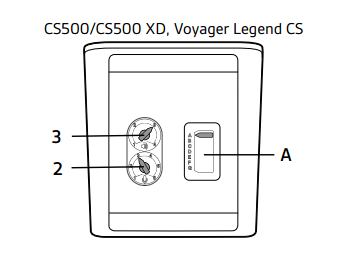
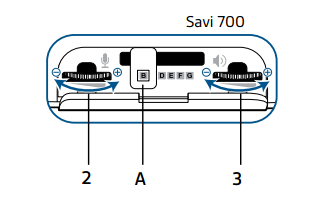
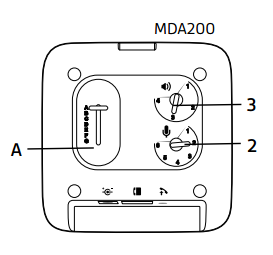
Set the compatibility, speaking volume and listening volume switches on your headset base. Reference the chart and image below for the required settings.
| Setting | CS50/CS55/CS70/CS70N/ CS351N/CS361N APP-5 Cable |
CS500 Series APP-51 Cable |
Savi Office/700 Series APP-50 or APP-51 Cable |
| Compatibility | 1 | A | A |
| Speaking Volume | A | 2 | 2 |
| Listening Volume | 2 | 3 | 3 |
| Image of Settings Below | Image of Settings Below |
Image of Settings Below |
Was this article helpful?
That’s Great!
Thank you for your feedback
Sorry! We couldn't be helpful
Thank you for your feedback
Feedback sent
We appreciate your effort and will try to fix the article